Beskrivning
Visa orginaltexten
Micro Looper
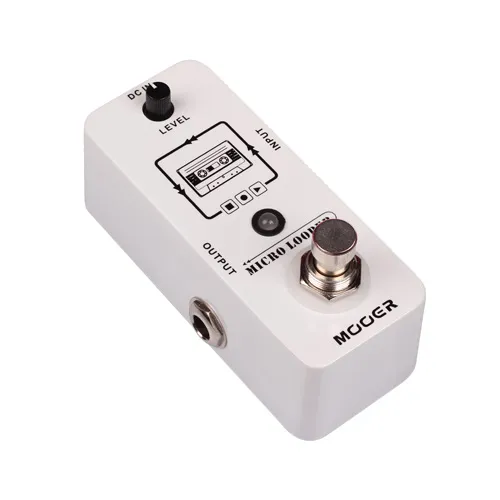
MICRO LOOPER ärver MINI-storleken från MICRO SERIES. Spela in, spela upp, stoppa, överdubba och radera, alla dessa funktioner kan styras med en enda fotpedal. Detta ger dig en enkel och direkt driftupplevelse. MICRO LOOPER har upp till 30 minuters inspelningstid och obegränsade överdubbningstider. Du kan fokusera på din musik och behöver inte oroa dig för andra problem.
Produktegenskaper:
1.True Bypass
När Micro Looper är i Bypass-status skulle det inte påverka den ursprungliga signalen, vilket säkerställer att din signal är tydlig och förlustfri.
2?Inspelningstid
Micro Looper har upp till 30 minuters inspelningstid, tillräckligt för att du ska kunna spela in dina låtar.
3.Obegränsade överdubbningstider
Micro Looper har ingen maxgräns för överdubbningstiderna.
4? Ljudåterställning av hög kvalitet
Genom att använda högkvalitativa elektroniska komponenter som säkerställer att uppspelningsljudsignalen är lika tydlig som hur de spelas in, kommer du aldrig att förlora någon detalj.
5.Mini storlek
Ärv Mini-storleken på MICRO SERIES-pedalerna, din pedalbräda kan få mer utrymme och därför kan du lägga fler pedaler i den.
6. Slingnivåvred
Denna lilla ratt kan styra slingans volym. Kan du inte höra din SOLO? Sänk volymen lite!
7. Enkel drift
Stoppa/Radera/Gör om, alla dessa funktioner styrs av bara en fotkontakt. 8. Loop sparande funktion
Orolig för att förlora dina inspelningar efter att du stängt av strömmen? Du behöver inte oroa dig, MICRO LOOPER sparar alla loopinspelningsdata automatiskt när strömmen är avstängd. Du kommer aldrig att förlora din inspiration!
MICRO LOOPER Drift
Hur man spelar in loopar/överdub
För att starta inspelningen, tryck en gång på fotpedalen, lysdioden lyser RÖTT,
indikerar att Micro Looper är i inspelningsläge.
För att växla till uppspelning, tryck på fotpedalen igen för att avsluta inspelningsläget.
Lysdioden blir BLÅ och startar uppspelning.
Du kan spela in en annan loop baserat på den ursprungliga loopen (Overdub),
tryck på fotpedalen medan originalslingan spelas upp, lysdioden kommer
vrid till RÖTT, vilket indikerar att Micro Looper är i inspelningsläge igen.
Tryck på fotkontakten en gång till för att avsluta inspelningsläget. Lysdioden kommer
bli BLÅTT. Micro Looper kommer att spela upp både originalslingan och
den nyligen tillagda overdub-inspelningen.
Hur man ångrar inspelningar
För att radera din senaste inspelning trycker du bara på fotpedalen och håller den nedtryckt
i 2 sekunder eller längre. Lysdioden blinkar snabbt två gånger.
Då kommer inspelningen att raderas.
Hur man gör om inspelningar
Om du raderade din senaste inspelning men vill ha tillbaka den kan du återställa den
genom att helt enkelt trycka och hålla ned fotpedalen i 2 sekunder eller längre. Lysdioden
kommer att blinka två gånger snabbt. Sedan kommer inspelningen att återställas.
Hur man stoppar/startar/tar bort slingorna
För att stoppa loop-uppspelningen, tryck på fotpedalen två gånger
snabbt. Lysdioden börjar blinka i BLÅTT.
För att starta slingan igen, tryck på fotpedalen en gång.
För att radera allt du har spelat in trycker du två gånger på fotpedalen
snabbt och håll ned den andra tryckningen. Lysdioden släcks,
indikerar att alla loopdatum har raderats.
Visa översättning
Micro Looper
MICRO LOOPER inherits the MINI size of MICRO SERIES. Record, playback, stop, overdub and delete, all these functions can be controlled by one single footswitch. This gives you an easy and direct operation experience. MICRO LOOPER has up to 30 minutes of recording time and unlimited overdubbing times. You can focus on your music and need not to worry about other troubles.
Product features:
1.True Bypass
When Micro Looper is in the Bypass status, it would not affect the original signal,which ensures your signal to be clear and lossless.
2.Recording Time
Micro Looper has up to 30 minutes of recording time, enough for you to record down your songs.
3.Unlimited overdubbing times
Micro Looper has no maximum limit for the overdubbing times.
4.High quality sound restoration
Using high quality electronic components which ensure the playback audio signal as clear as the way they are recorded, you will never lose any detail.
5.Mini Size
Inherit the Mini size of the MICRO SERIES pedals, your pedal board can have more space and therefore you can put more pedals in it.
6.Loop level knob
This little knob can control the volumn of loop. Can’t hear your SOLO? Turn down your volumn a little bit!
7.Easy operation
Stop/Delete/Redo, all these functions are controlled by just one footswitch. 8.Loop saving function
Worry about losing your recordings after you cut off power? No need to worry, MICRO LOOPER will save all the loop recordings data automatically when the power is off. You will never lose your inspiration!
MICRO LOOPER Operation
How to record Loops/overdub
To start recording, press the footswitch once,the LED will be lit in RED,
indicating Micro Looper is in Record mode.
To switch to playback,press the footswitch again to quit Record mode.
The LED will turn BLUE,and start playback.
You can record another loop based on the original loop(Overdub),
press the footswitch while the original loop is playing back,the LED will
turn RED, indicating Micro Looper is in Record mode again.
Press the footswitch once again to quit Record mode. The LED will
turn BLUE. Micro Looper will playback both the original loop and
the newly added overdub recording.
How to Undo recordings
To delete your last recording,simply press and hold the footswitch
for 2 seconds or longer.The LED will blink twice rapidly.
Then the recording will be deleted.
How to Redo recordings
If you deleted your last recording but you want it back ,you can restore it
by simply pressing and holding the footswitch for 2 seconds or longer.The LED
will blink twice rapidly.Then the recording will be restored.
How to stop/start/delete the loops
To stop the loop playback, press the footswitch twice
quickly.The LED will start blinking in BLUE.
To start the loop again,press the footswitch once.
To delete everything you have recorded, press the footswitch twice
quickly and hold down on the second press.The LED will turn off,
indicating all the loop date have been deleted.